

Intelligence Centre
Your intelligence, in one operational view.
Most tools in this category hand you a folder of dashboards and leave the synthesis to you. The Intelligence Centre is the opposite: one place that holds the state of every module, what it found, how current it is, and what is worth doing next.
No card required.
- First action, not a wall of charts
- Live module state
- Freshness on every signal
One platform, not a toolbox
A collection of audit tools makes the connections your problem.
Separate tools each produce a separate verdict, and the work of relating them falls to whoever opens them. The Intelligence Centre exists because the relationships between those signals are where the actual answer lives.
-
AI visibility evidence
What answer engines referenced, and where you were absent.
-
Site evidence
Technical, metadata, performance, crawl and access findings.
-
Company context
What your organisation actually does and cares about.
-
Opportunities
The patterns judged worth attention.
-
Active work
What is committed to and currently in flight.
-
Verification and proof
What is waiting on evidence, and what has been shown.
-
Alerts and activity
Changes and conditions that need looking at.
-
Module state and freshness
Which parts of the picture are current, and which have aged.
The decision layer
It opens on what to do, not on how much data it has.
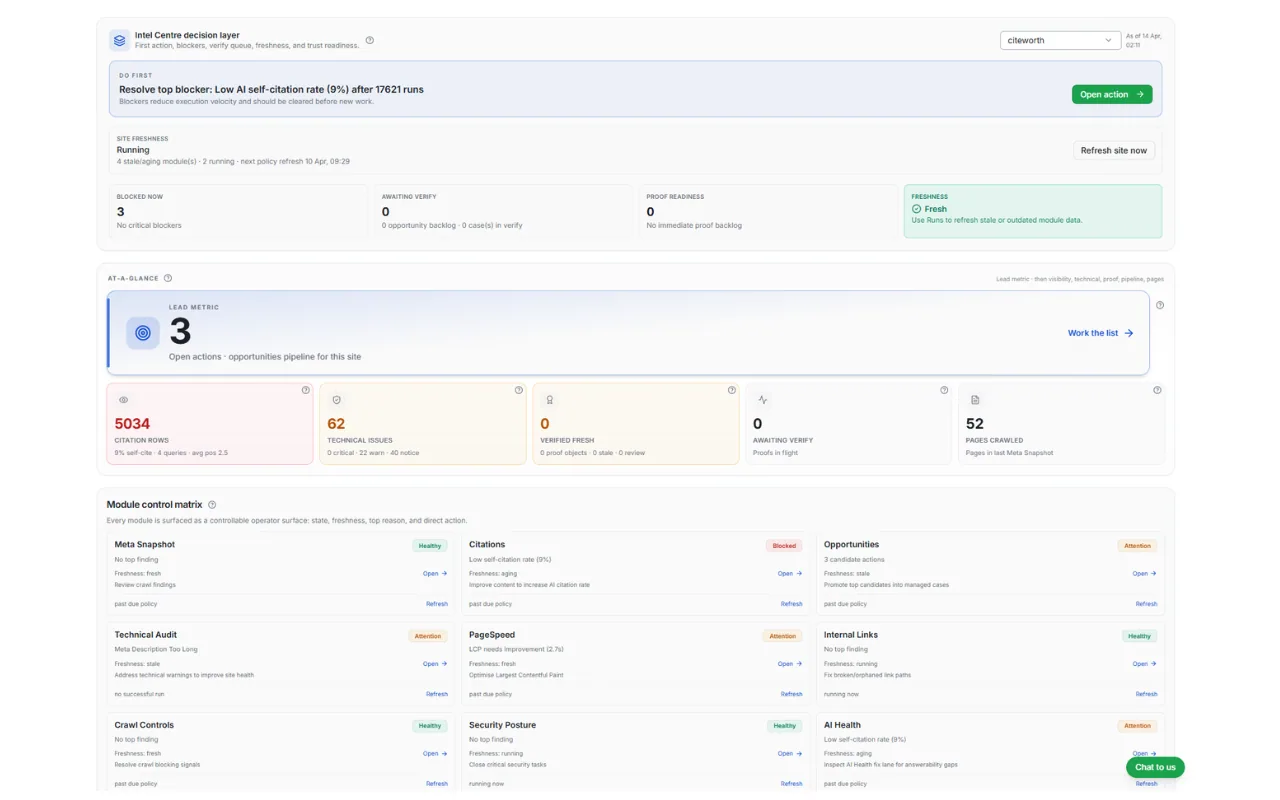
The top of the view answers the operator's real question before anything else: is anything blocked, is anything waiting on me, and what should I pick up first.
- 01
First action
The single thing worth doing next, stated plainly, rather than left to be inferred from a set of charts.
- 02
Blockers
Conditions holding work up. Blockers are called out separately because clearing them usually has to happen before new work is worth starting.
- 03
Verify queue
Work that has been implemented and is waiting on evidence. Easy to forget, and the reason loops stay open.
- 04
Proof readiness
Whether there is anything ready to be shown, so reporting is a state you can see rather than a scramble.
Module control matrix
Every module, as something you can read and act on in one place.
Rather than a link list, each module reports the same four things. That consistency is what turns a set of tools into an operational surface — you can scan the whole platform without opening any of it.
-
State
Healthy, attention or blocked.
-
Freshness
Fresh, running, aging or stale.
-
Top reason
The finding driving that state.
-
Direct action
Open the module, or refresh it.
- Citations
- AI Health
- Meta Snapshot
- Technical Audit
- PageSpeed
- Internal Links
- Crawl Controls
- Security Posture
- Opportunities
Schematic of the module control matrix: each CiteWorth module reported with a state, a freshness value, its top finding and a direct action.
Freshness is first-class
Evidence has a shelf life, and pretending otherwise is how teams act on stale findings.
Every module carries its own currency, and the view distinguishes between fresh, running, aging and stale. A confident conclusion drawn from a stale module is worse than no conclusion, so the age of the evidence sits next to the evidence itself rather than being buried in a timestamp somewhere.
Refreshing a module re-runs the underlying evidence. Nothing here changes your site.
Three different things
Where the Intelligence Centre sits.
These names sound related because they are. They do different jobs.
-
You are here
Intelligence Centre
The operational view. Current state across every module, what is blocked, and what to do first.
-
Different job
Intelligence Library
The persistent context. What your organisation does, who it serves, and what it stands behind.
-
Different job
Operator
The conversational interface. Asking questions across the evidence, context and work.
What the Intelligence Centre connects to
Almost everything, which is the point. These are the places it most often sends you.
See the whole platform in one view.
Add a site, run a baseline, and watch the modules report in.
Want a walkthrough of the operational view? Talk to us